Lode Runner — dig, drop, run
Runs here
1985 · Broderbund · System 6 · Mini vMac (Mac SE) · 512×342 black and white
Guide updated September 2026
Yes: Lode Runner runs free in your browser on this page. Press Start and it boots System 6 on an emulated Mac SE, with no download, no plugin and no account. Controls: Arrow keys (run left and right, climb ladders, hang along ropes), Z / X, or comma / period (dig left, dig right). Your progress is saved in your own browser between visits. It plays best with a keyboard; on a phone, on-screen keys appear once it starts.
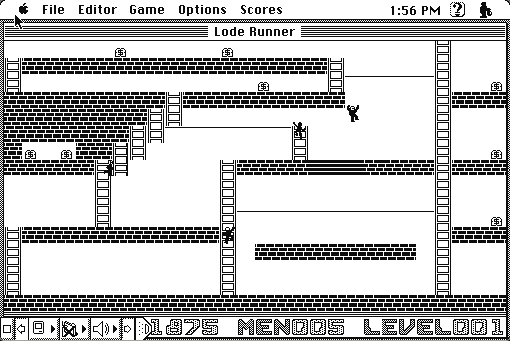
You are a small figure in a lattice of brick and ladders. There is gold on the screen and guards chasing you, and your only weapon is the ability to dig a hole in the floor beside you. A guard falls in. The hole fills back up. You get on with it.
That is the whole game, and Broderbund built 150 levels out of it. This is the Macintosh version, and it includes the level editor that turned a puzzle game into a thing people made things with.
Boots straight into Lode Runner on an emulated Macintosh SE. The Game menu starts a new game; Editor opens the level designer.
Controls
| Arrow keys | Run left and right, climb ladders, hang along ropes |
| Z / X, or comma / period | Dig left, dig right |
| Game menu | New game, choose a starting level, pause |
| Editor menu | Build and save your own levels |
| Cmd-Q | Quit to the Finder |
Doug Smith sold Lode Runner to Broderbund in 1983; the property passed to Tozai Games, who still sell modern remakes under the name. Those remakes are new software. This is the 1985 Macintosh release, which no one has sold in forty years and which Tozai does not distribute in any form. Full reasoning is in notices/lode-runner.md, and the takedown promise applies without argument.
Archives
- Internet Archive — the preserved Macintosh floppy this copy came from.
- Macintosh Garden — other releases, manuals and box scans.
How it works & what to expect
| Machine | Macintosh SE, 512×342 black and white |
|---|---|
| System | System 7.5.3 |
| Emulator | Mini vMac, compiled to WebAssembly |
| Version | 1.0, the Macintosh release |
| Saves | Inside the emulated Mac, in your browser. Do not keep anything irreplaceable there. |
The whole game is on one screen at a time, in black and white, which is all it ever needed. Collect every piece of gold on a level and a ladder appears that takes you to the next one.
Digging is the entire trick. You cannot jump, you cannot fight, and you cannot outrun a guard forever. You can only remove a piece of floor next to you, which a guard will then fall into, and which will heal shut after a few seconds — with the guard inside it if you were fast enough, and with you inside it if you were not.
Why it is harder than it looks
Every level is a small logic problem wearing an action game's clothes. The gold is reachable, but usually only in one order, and often only if you have already trapped a guard somewhere useful — a guard standing in a hole is a platform you can run across.
Guards also carry gold. A guard who picks up a piece drops it when he falls, which means some levels cannot be finished without deliberately letting one rob you first. Working that out is the moment the game stops being about reflexes.
The later levels are pure trap design: a wrong dig walls you in permanently, and the game will happily let you stand in a sealed pocket of brick until you give up and restart the level.
The editor, and what it started
Lode Runner shipped with a level editor in 1983, which was close to unheard of. Not a hidden debug mode — a documented feature, on the menu, with a save command.
The result was that people made levels and swapped them on disks and over bulletin boards, and a game with 150 levels effectively never ran out. It is one of the earliest mainstream examples of a game treating its own content as something players should be making, which is now such a normal idea that it is strange to point at.
The editor is on the menu bar here, and the levels you build save into the emulated Mac.
Questions people ask
Is this the original Lode Runner?
It is the Macintosh release of it, version 1.0, in black and white with all 150 levels and the editor. Not Lode Runner Legacy or any of the later Tozai remakes, which are new games.
How do I dig?
Z and X dig the floor to your left and right. You cannot dig the floor you are standing on, and you cannot dig solid stone — only the brick.
I have walled myself in. Now what?
Restart the level. The game does not consider this a bug, and the later levels are designed so that a careless dig is fatal.
Can I make my own levels?
Yes — the Editor menu is the original level designer, and it saves into the emulated Mac's disk. That disk lives in your browser, so treat anything you build there as temporary.
Why is it black and white?
The Macintosh in 1985 was black and white. The game is drawn entirely in one-bit patterns and does not lose anything for it.
Why does it run on an emulated SE rather than something faster?
It is a 1985 black-and-white build and a compact Mac is the machine it was written for. A faster colour Mac gains it nothing and risks the colour-screen problems that catch other titles from this era.
Put Lode Runner on your own site
Free, no permission needed and no account. Paste this where you want the machine to appear; it brings its own emulator and asks nothing of your page.
<iframe src="https://macemu.com/embed/lode-runner/"
        width="512" height="342"
        style="border:0;max-width:100%"
        allowfullscreen
        title="Lode Runner"></iframe>
<p><a href="https://macemu.com/run/lode-runner/">Play Lode Runner</a> free on macemu</p>
Sized to this title's real screen. How embedding works.