Solitaire Till Dawn — a great many ways to lose at cards
Runs here
2001 · Semicolon Software · Mac OS 8 · SheepShaver (Power Macintosh 9500) · 800×600 at 8-bit colour
Guide updated September 2026
Yes: Solitaire Till Dawn runs free in your browser on this page. Press Start and it boots Mac OS 8 on an emulated Power Macintosh 9500, with no download, no plugin and no account. Controls: Games menu (choose from the collection of variants), Card Shark menu (hints and the odds on the current deal). Your progress is saved in your own browser between visits.
Solitaire Till Dawn was the solitaire collection Macintosh owners actually had. Dozens of games share one engine, one set of card graphics and one set of conventions, so learning a new variant is a matter of reading its rules rather than learning a new program.
The presentation is the reason it stood out: real card art, a Décor menu for the table, statistics per game, and a guide explaining each variant's rules. It was made with considerably more care than the genre usually gets.
Boots Mac OS 8.6 and opens Solitaire Till Dawn. A notice explains the demo's 100-game limit; click OK and pick a game from the Games menu.
Controls
| Mouse | Drag cards; double-click to send one to a foundation |
| Games menu | Choose from the collection of variants |
| Card Shark menu | Hints and the odds on the current deal |
| Décor menu | Table and card-back artwork |
| Cmd-Q | Quit to the Finder |
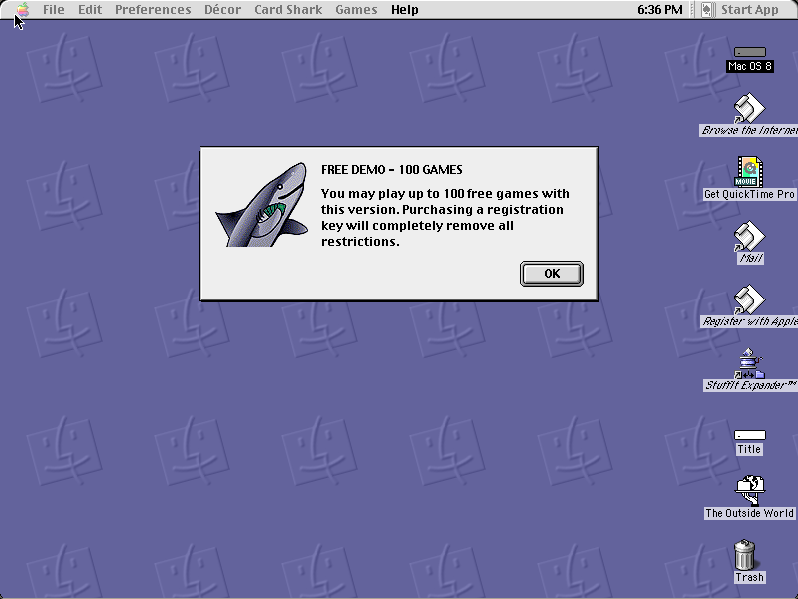
This is the freely distributed demo build, limited by its author to 100 games and saying so on startup. That limit is intact and unpatched. The classic Mac OS version is in no current product.
Archives
- Internet Archive — the Tucows Macintosh archive copy this was built from.
How it works & what to expect
| Machine | Power Macintosh 9500, 800×600 in colour |
|---|---|
| System | Mac OS 8.6, shared with every other title of this era |
| Emulator | SheepShaver, compiled to WebAssembly |
| Version | 4.0.1 |
| Saves | Games and statistics save inside the emulated Mac |
This is the free demo. On startup it says so: a hundred games, after which it asks for a registration key. That is the author's limit and it has not been touched. A hundred games is a great deal of solitaire, and the notice is left visible because removing it would be modifying the software.
It does not carry its own operating system; Mac OS 8.6 comes from the shared image, so it starts faster if you have opened another Mac OS 8 title here.
Why it is remembered
It is the Macintosh solitaire program. Windows had its bundled Klondike and a thousand imitators; the Mac had this, and it was better than any of them — more variants, better presentation, and an actual rules guide.
The Card Shark menu. Telling you the odds on the deal you are looking at, and whether a game is even winnable, was an unusually honest feature for a solitaire program and is still uncommon.
It outlived classic Mac OS. Semicolon Software carried the line into Mac OS X, which is why the name may be familiar from long after this build. That later software is separate and is not what is here.
Getting started
Open the Games menu and pick something other than Klondike. The collection's value is in the variants you have not played — Freecell, Spider, Yukon, Canfield and a long tail of stranger ones.
Read the game guide for a variant before you start it. Several have rules that look like Klondike and are not, and losing to a rule you did not know is nobody's idea of solitaire.
Use Card Shark when a deal feels impossible. Sometimes it is, and knowing that is more satisfying than grinding at it.
Questions people ask
Is this the full version?
No, it is the free demo, which plays up to 100 games before asking for a registration key. That limit is the author's and has not been removed.
How many card games are there?
Dozens, all sharing one engine, listed in the Games menu with a rules guide for each.
Can I save?
Yes — games and statistics persist inside the emulated Macintosh in your browser.
What is Card Shark?
A menu that tells you the odds on the current deal and whether it can be won at all.
Is this related to the Mac OS X version?
Same line, different software. Semicolon Software continued Solitaire Till Dawn into Mac OS X; this is the classic Mac OS 4.0.1 build.
Why does it take a while to start?
It boots Mac OS 8.6 first, from the image shared with the other Mac OS 8 titles here.
Put Solitaire Till Dawn on your own site
Free, no permission needed and no account. Paste this where you want the machine to appear; it brings its own emulator and asks nothing of your page.
<iframe src="https://macemu.com/embed/solitaire-till-dawn/"
        width="800" height="600"
        style="border:0;max-width:100%"
        allowfullscreen
        title="Solitaire Till Dawn"></iframe>
<p><a href="https://macemu.com/run/solitaire-till-dawn/">Play Solitaire Till Dawn</a> free on macemu</p>
Sized to this title's real screen. How embedding works.