Reckless Drivin' — keep it on the road Runs here
2000 · Jonas Echterhoff · Mac OS 8 · SheepShaver (Power Macintosh 9500) · 800×600 at 8-bit colour
Guide updated September 2026
A car, a road seen from above, and a clock. Reckless Drivin' asks you to get to the end of each level as fast as you can while traffic, cops and the edge of the road all try to stop you. The car skids properly, leaves tyre tracks, and comes apart when you misjudge a bend, which you will.
Jonas Echterhoff wrote it on his own in Germany and released it as Mac shareware in 2000, the sequel to his 1996 game Burning Rubber. This is version 1.44 from 2003, the last release, running on an emulated Power Macintosh.
Mac OS 8.6 starts and opens the game by itself. Press Return at the shareware notice (Let Me Try Out First!), then click START. The arrow keys drive. For a sharper picture, untick Line Skipping under PREFS.
Controls
| ↑ arrow | Gas |
| ↓ arrow | Brake, then reverse |
| ← / → arrows | Steer |
| Shift | Kickdown |
| Space | Handbrake |
| Option | Drop a mine |
| Cmd (⌘) | Fire a missile |
| P / Esc | Pause / abort the game |
Reckless Drivin' is shareware, and its readme says it "may be freely distributed, as long as all the files that came with the original package are included". Every file from the package is on the disk, unregistered, with the shareware notice left alone. Full reasoning is in notices/reckless-drivin.md, and the takedown promise applies without argument.
Archives and originals
- Internet Archive: the Tucows mirror copy this came from.
How it works & what to expect
| Machine | Power Macintosh, 800×600 |
|---|---|
| System | Mac OS 8.6 with CarbonLib and Apple's DrawSprocket |
| Emulator | SheepShaver, compiled to WebAssembly |
| Version | 1.44 (27 January 2003), © 2000–2003 Jonas Echterhoff |
| Shareware | Unregistered: the first three levels are playable |
The game's own defaults put the driving controls on the numeric keypad (8, 5, 4 and 6), which most laptops do not have. This page sends the arrow keys to those keypad keys, so the arrows simply work. Shift, Space, Option and Cmd are the game's own defaults.
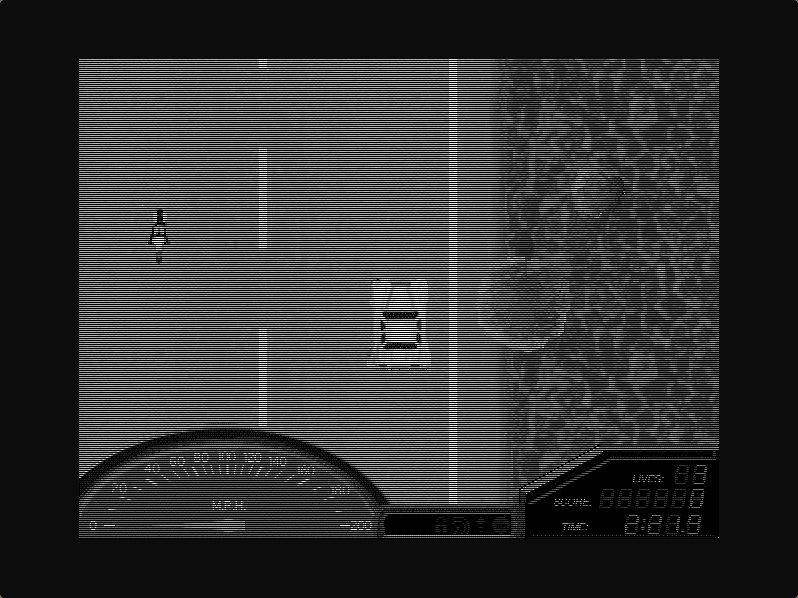
The picture has stripes at first. That is the game's Line Skipping option, which draws every other line to run faster on the Macs of 2000. Click PREFS on the main menu and untick it; the emulated machine is quick enough without it. Settings are not kept between visits.
Playing it
Each level is a long road with a time limit, shown bottom right with your score and remaining lives. Traffic runs in both directions. Leaving the tarmac is usually fatal, and the game's own FAQ is unrepentant about that: arcade games are not meant to be realistic.
The police join in as you go, and you have two answers to them: mines, dropped behind you with Option, and missiles, fired ahead with Cmd. The handbrake on Space is what gets you round the tight corners without losing all your speed, and a skid is often the right way through a bend rather than a mistake.
The unregistered game stops after the third level. Registration was $12 through Kagi, which has since closed, so the first three levels are what can be played today.
Why it is remembered
Reckless Drivin' came late in the classic Mac's life, in 2000. It was then carbonised to run natively on the first versions of Mac OS X, which is why this final version lives inside an application package that Mac OS 9 and Mac OS X could both open.
Its handling is the point: the car slides, grips again, and spins if you are careless, on a road that zooms out as you speed up. It is a small game made by one person, and it still plays well.
Questions people ask
Is this the whole game?
It is the complete shareware release, unregistered, which plays the first three levels. Registering unlocked the rest, but the payment service it used has closed.
Do I need a numeric keypad?
No. The game's defaults use the keypad, but this page sends the arrow keys there for you.
Why is the picture striped?
That is the game's Line Skipping option, on by default for speed. Click PREFS on the main menu and untick it.
Does it run on a phone?
It needs a keyboard, so a desktop or laptop is the way to play.
Who made it?
Jonas Echterhoff, working alone. It followed his 1996 Mac game Burning Rubber, which is why the title screen calls it Burning Rubber 2.
Put Reckless Drivin' on your own site
Free, no permission needed and no account. Paste this where you want the machine to appear; it brings its own emulator and asks nothing of your page.
<iframe src="https://macemu.com/embed/reckless-drivin/"
        width="800" height="600"
        style="border:0;max-width:100%"
        allowfullscreen
        title="Reckless Drivin'"></iframe>
Sized to this title's real screen. How embedding works.