Hot Dog Stand: The Works — run the stand Runs here
1998 · Sunburst Communications · Mac OS 8 · SheepShaver (Power Macintosh 9500) · 800×600 at 8-bit colour
Guide updated October 2026
Yes: Hot Dog Stand runs free in your browser on this page. Press Start and it boots Mac OS 8 on an emulated Power Macintosh 9500, with no download, no plugin and no account. Controls: Type + Return (sign in with your name), Help menu (the game's own help). Your progress is saved in your own browser between visits. It plays best with a keyboard; on a phone, on-screen keys appear once it starts.
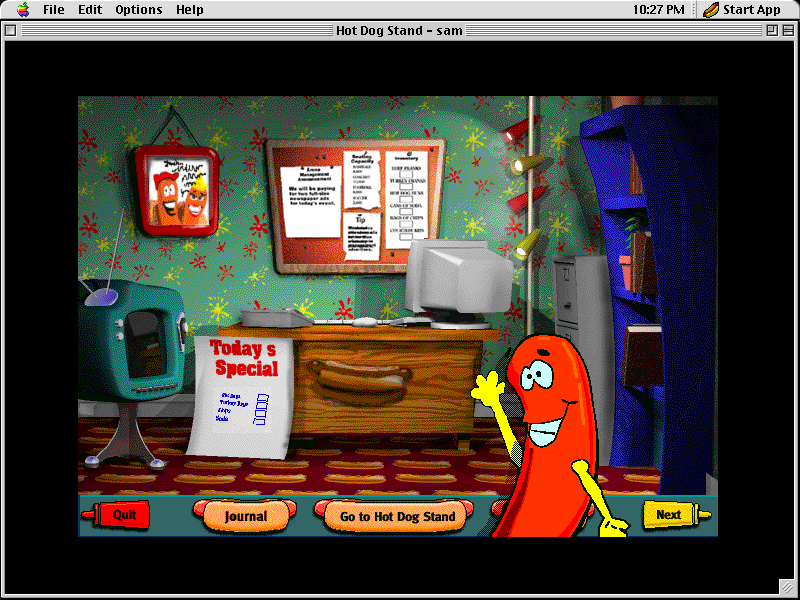
The school computer lab game where the maths came disguised as a summer job. You run a hot dog stand at events in an arena: read the announcements, check the seating capacity and the inventory, decide what to order and what to charge, then open the stand and see how the day goes.
This is Sunburst's Macintosh CD, Hot Dog Stand: The Works version 1.1, running here on an emulated Power Macintosh under Mac OS 8.6.
Mac OS 8.6 starts and opens Hot Dog Stand by itself. Type your name at the sign-in and press Return, choose a level, then plan the day from the office.
Controls
| Mouse | Everything: the office, the bulletin board, the buttons along the bottom |
| Type + Return | Sign in with your name |
| Help menu | The game's own help |
Sunburst Communications published Hot Dog Stand: The Works for schools, and this CD release has not been sold for well over twenty years; no current product contains it. Full reasoning is in notices/hot-dog-stand.md, and the takedown promise applies without argument.
Archives and originals
- Internet Archive: the preserved CD this copy came from.
How it works & what to expect
| Machine | Power Macintosh, 800×600, 256 colours |
|---|---|
| System | Mac OS 8.6 |
| Emulator | SheepShaver, compiled to WebAssembly |
| Version | Hot Dog Stand: The Works 1.1 |
| Saves | Inside the emulated Mac, in your browser |
The first start is the slow one: Mac OS 8.6 downloads once, then the game. Later visits start much faster.
Starting out
The stand asks you to sign in; type a name and press Return. Then pick a level: Beginner has no random events and guides you with flashing objects, Intermediate adds some random events, and Advanced many.
The day begins in the office. The bulletin board carries the arena management's announcement, the seating capacity for the event, your inventory and a tip; a Today's Special list waits to be filled in. Along the bottom are Quit, Journal, Go to Hot Dog Stand and Next.
Why schools used it
Sunburst made software for classrooms, and Hot Dog Stand is maths by stealth: estimating a crowd, working out how much stock that means, pricing, and reading the results afterwards. The random events at the higher levels are the business lesson: the weather, the crowd and the supplier do not always do what the plan expected.
Questions people ask
Is this the Hot Dog Stand from school?
If your school had Macs in the late 1990s and ran Sunburst software, very probably. This is Hot Dog Stand: The Works, version 1.1, for Macintosh.
Which level should I start on?
Beginner. It has no random events and points you at what to do next with flashing objects. Intermediate and Advanced add random events.
Can I save and come back?
Your progress stays inside the emulated Mac, which is kept in your own browser between visits.
Does it work on a phone?
It loads and it is all mouse, but the first start downloads a large system and the buttons are small. A computer is much more comfortable.
Put Hot Dog Stand on your own site
Free, no permission needed and no account. Paste this where you want the machine to appear; it brings its own emulator and asks nothing of your page.
<iframe src="https://macemu.com/embed/hot-dog-stand/"
        width="800" height="600"
        style="border:0;max-width:100%"
        allowfullscreen
        title="Hot Dog Stand"></iframe>
Sized to this title's real screen. How embedding works.