Oregon Trail II — the 1995 sequel Runs here
1995 · MECC · Mac OS 8 · SheepShaver (Power Macintosh 9500) · 800×600 at 8-bit colour
Guide updated October 2026
Yes: Oregon Trail II runs free in your browser on this page. Press Start and it boots Mac OS 8 on an emulated Power Macintosh 9500, with no download, no plugin and no account. Controls: Game menu (save at a landmark, or load a saved game), Cmd-Q (quit to the Finder). Your progress is saved in your own browser between visits.
The sequel most people only ever saw in a school library. Where the original is a few screens of text and pixel art, Oregon Trail II is photographs, recorded voices and full-motion video: you pick a year, a starting town, a profession and a destination, buy a wagon and a team, and walk two thousand miles west with a wagon party you have to keep alive.
This is MECC's Macintosh CD release, version 1.32, running here on an emulated Power Macintosh under Mac OS 8.6. The CD's own bundled saves come with it, so you can also start part-way down the trail.
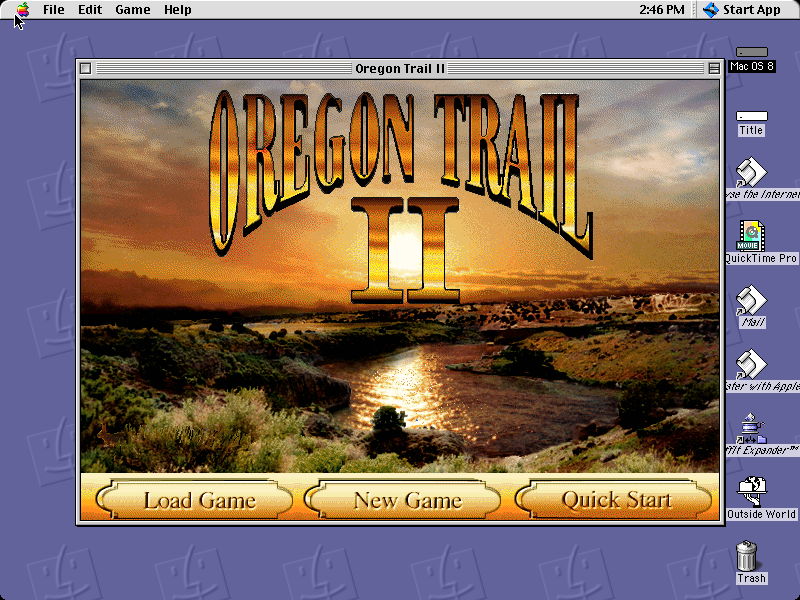
Mac OS 8.6 starts and opens Oregon Trail II by itself. Choose Quick Start for a party that is ready to go, or New Game to choose everything yourself, then Hit The Trail!
Controls
| Mouse | Everything: the choices on each screen, and the Guide, Diary, party and wagon buttons along the bottom |
| Game menu | Save at a landmark, or load a saved game |
| Cmd-Q | Quit to the Finder |
MECC's educational catalogue passed from MECC to SoftKey, The Learning Company, Mattel and eventually Houghton Mifflin Harcourt. Oregon Trail II has not been sold in any form for well over twenty years, and no current product contains it. Full reasoning is in notices/oregon-trail-ii.md, and the takedown promise applies without argument.
Archives and originals
- Internet Archive: the preserved hybrid CD this copy came from.
- Macintosh Garden: other releases and scans.
How it works & what to expect
| Machine | Power Macintosh, 800×600, 256 colours |
|---|---|
| System | Mac OS 8.6 |
| Emulator | SheepShaver, compiled to WebAssembly |
| Version | Oregon Trail II for Macintosh, version 1.32 (1996) |
| Saves | Inside the emulated Mac, in your browser |
The first start is the slow one. Mac OS 8.6 downloads once, and then the game reads what it needs from a disc that was mostly photographs and video. Later visits start much faster. The game plays in a 640×480 window on the 800×600 desktop, exactly as it did on a school Mac.
Starting out
The title screen offers three ways in. Quick Start builds a character for you, buys the supplies, and drops you just outside your jumping-off town; the Prologue tells you who you are (a pharmacist bound for the Rogue River Valley in 1851, say) and Hit The Trail! starts walking. New Game lets you set every choice yourself, and then you buy your own draft animals in town. Load Game opens a saved game.
On the trail each landmark is a screen of its own, with choices such as Continue, Rest here, Go into town and See who's around. The row along the bottom carries the date, the weather, the miles travelled and your party's morale, plus the Guide, your Diary, your party and your wagon.
The saves on the CD
MECC shipped the disc with a folder of ready-made games saved at landmarks along the way: Fort Laramie, Courthouse and Jail Rocks, South Pass, Fort Hall, City of Rocks, the California Trail junction, Emigrant Gap, the Barlow Toll Road and more, plus sets called Jumping Off, Good Hunting and Rafting. They are all here, in the Saved Games folder that Load Game opens. Teachers used them to drop a class straight into the part of the journey they were studying.
Your own games can only be saved at landmarks, not between them. That is the game's rule, not this site's.
Oregon Trail II and the original
MECC released Oregon Trail II in 1995, at the height of the CD-ROM boom, and it is a much bigger game than the one most people remember. It keeps the shape: a store, a long walk, hunting, river crossings and the steady arithmetic of food, health and money. Around it, it adds professions with their own skills, more trails, towns you can walk into, people to talk to along the way, and video at the river crossings and the map.
This 1.3 release added the Quick Start button and drop-down lists for buying, trading and dumping goods, and replaced the original title painting with the sunset over the river you see here.
Questions people ask
Is this the Oregon Trail II I played at school?
If your school had Macs with CD-ROM drives in the late 1990s, very probably. This is MECC's Oregon Trail II CD for Macintosh, version 1.32, the release with the Quick Start button.
How is it different from the original Oregon Trail?
It is a far bigger game: photographs, voices and video instead of pixel art, professions with their own skills, towns you can walk into and people to talk to. The original 1990 Macintosh Oregon Trail is also here, at /run/oregon-trail/.
How do I save?
From the Game menu, but only at a landmark; the save option is disabled between landmarks. Saves stay in your own browser between visits.
Can I start part-way down the trail?
Yes. Choose Load Game and open the Saved Games folder: the CD came with games saved at Fort Laramie, South Pass, Fort Hall and a dozen more landmarks.
It says I can't hunt because I have no ammunition.
Hunting needs both bullets and gunpowder. Check your wagon for both, and buy more at the next town or fort.
Does it work on a phone?
It loads, and it only needs a pointer, but the first start downloads a large system and the buttons are small. A computer is much more comfortable.
Put Oregon Trail II on your own site
Free, no permission needed and no account. Paste this where you want the machine to appear; it brings its own emulator and asks nothing of your page.
<iframe src="https://macemu.com/embed/oregon-trail-ii/"
        width="800" height="600"
        style="border:0;max-width:100%"
        allowfullscreen
        title="Oregon Trail II"></iframe>
Sized to this title's real screen. How embedding works.