Jam Session — you cannot play a wrong note
Runs here
1988 · Bogas Productions / Brøderbund · System 6 · Mini vMac (Mac Plus) · 512×342 black and white
Guide updated September 2026
Yes: Jam Session runs free in your browser on this page. Press Start and it boots System 6 on an emulated Mac Plus, with no download, no plugin and no account. Controls: Keyboard (every key is a musical phrase, in key and in time), Jam menu (choose a backing track). Your progress is saved in your own browser between visits. It plays best with a keyboard; on a phone, on-screen keys appear once it starts.
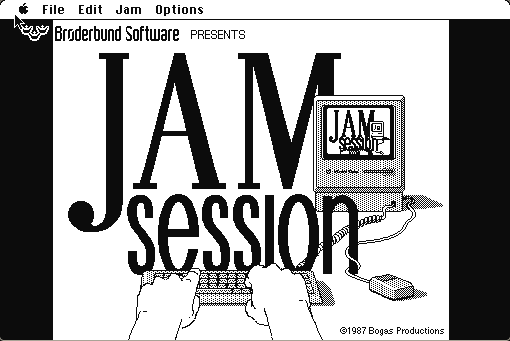
A backing track plays. You hit keys on the Macintosh keyboard. What comes out is a lick that is in the right key, in time, and appropriate to the song — because every key is mapped to a phrase that Bogas Productions wrote to fit, not to a note.
It is a toy rather than an instrument, and it is entirely honest about that. The pleasure is that it works: a person with no musical training can hammer the keyboard and produce something that sounds like a solo, which in 1988 was a small revelation.
Boots straight into Jam Session. Pick a song from the Jam menu, start it, and play the keyboard.
Controls
| Keyboard | Every key is a musical phrase, in key and in time |
| Jam menu | Choose a backing track |
| Options menu | Instrument, tempo and recording |
| Cmd-Q | Quit to the Finder |
Brøderbund's catalogue passed through The Learning Company and Riverdeep and is now largely with Houghton Mifflin Harcourt. Jam Session has not been sold since the early 1990s and is in no current product.
Archives
- Internet Archive — the Macintosh floppy this copy was made from.
How it works & what to expect
| Machine | Macintosh Plus, 512×342, black and white |
|---|---|
| System | The floppy's own — this disk carries the System it shipped with |
| Emulator | Mini vMac, compiled to WebAssembly |
| Saves | Recordings save inside the emulated Mac |
This is the only title on this site where the sound is the entire point, so it is worth making sure your browser is not muted before you start.
The Macintosh's built-in sound hardware is doing all of this — no MIDI, no external instrument. That an 8 MHz machine could mix a backing track and triggered samples in 1988 is part of what made the program notable.
Why it is remembered
It removed the wrong notes. Mapping keys to musically appropriate phrases rather than to pitches is a simple idea that has been reinvented many times since — in Guitar Hero's fret buttons, in loop-based music apps, in every toy that lets a non-musician improvise. Jam Session is one of the earliest consumer products built on it.
Brøderbund at its best. The company that published Print Shop, Carmen Sandiego and Myst had a particular knack for software that made an ordinary person feel briefly capable, and this is a clean example.
The sound was a selling point. Macintosh audio was better than most of its contemporaries and very little software made a case for it. Jam Session did.
Getting started
Turn the volume up. Silently, this program does nothing.
Pick a song and just play. There is nothing to learn and no way to be wrong, which is the design, and thinking about it will make you worse at it.
When you find something you like, use the recording option — it captures what you played over the backing track and saves it inside the emulated Mac.
Questions people ask
Do I need to know music?
No. Every key is mapped to a phrase that fits the backing track, so there are no wrong notes to play.
Do I need sound?
Yes. This is the one title here where audio is the entire point.
Can I record what I play?
Yes, and recordings save inside the emulated Macintosh in your browser.
Does it need MIDI or an instrument?
No. Everything comes out of the emulated Macintosh's own sound hardware.
Who made it?
Bogas Productions, published by Brøderbund in 1988.
Is it a real music tool?
No, and it does not claim to be. It is a toy, and a very good one.
Put Jam Session on your own site
Free, no permission needed and no account. Paste this where you want the machine to appear; it brings its own emulator and asks nothing of your page.
<iframe src="https://macemu.com/embed/jam-session/"
        width="512" height="342"
        style="border:0;max-width:100%"
        allowfullscreen
        title="Jam Session"></iframe>
<p><a href="https://macemu.com/run/jam-session/">Play Jam Session</a> free on macemu</p>
Sized to this title's real screen. How embedding works.