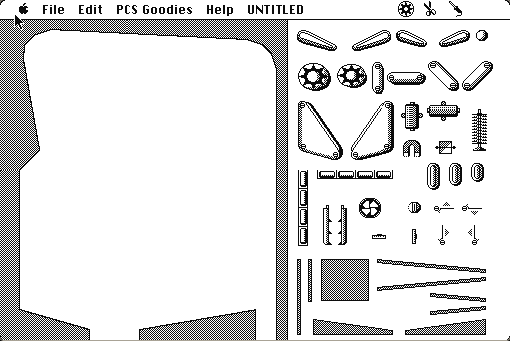
Pinball Construction Set — drag the bumpers where you want them
Runs here
1985 · Bill Budge / Electronic Arts · System 6 · Mini vMac (Mac Plus) · 512×342 black and white
Guide updated September 2026
Yes: Pinball Construction Set runs free in your browser on this page. Press Start and it boots System 6 on an emulated Mac Plus, with no download, no plugin and no account. Controls: Tools (the wrench sets physics — gravity, elasticity, speed), Paint tools (colour and decorate the playfield). Your progress is saved in your own browser between visits.
▶ Start Pinball Construction Set
You start with an empty table and a strip of parts down the side: bumpers, flippers, targets, drop targets, rollovers, spinners. You drag what you want onto the playfield, put it where you want it, and then you press a key and the ball drops and you play what you made.
That loop — build it, play it, go back and move that bumper two pixels — is the whole program, and in 1983 almost nothing else worked like it. There is no mode switch and no compile step. The thing you are editing is the thing that runs.
Boots straight into the editor with a blank table. Drag parts from the palette on the right, then start the ball.
Controls
| Mouse | Drag parts onto the table and move them around |
| Tools | The wrench sets physics — gravity, elasticity, speed |
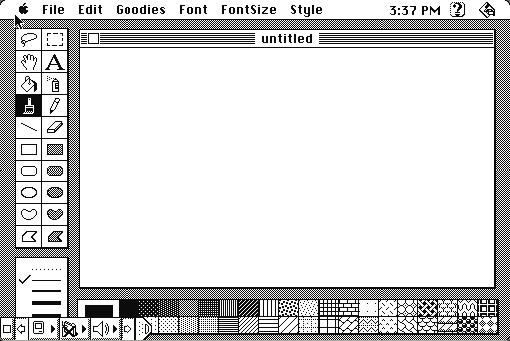
| Paint tools | Colour and decorate the playfield |
| Play | Drop the ball and play the table you just built |
Electronic Arts owns it and still exists. The 1985 Macintosh build has never been re-released and is in no current product; hosted as an out-of-commerce artefact.
Archives
- Internet Archive — the Macintosh floppy this copy was made from.
How it works & what to expect
| Machine | Macintosh Plus, 512×342, black and white |
|---|---|
| System | The floppy's own — this disk carries the System it shipped with |
| Emulator | Mini vMac, compiled to WebAssembly |
| Saves | Tables save inside the emulated Mac, in your browser |
The disk opens on an untitled table. There is a pre-built table on the disk if you want to see what a finished one looks like, but the blank sheet is the point.
The physics tools are worth finding early. Gravity, ball speed and elasticity are all adjustable, and a table that feels wrong is usually a physics problem rather than a layout problem.
Why it is remembered
It is the first mass-market construction set. Electronic Arts built a whole line on the name afterwards — Music Construction Set, Adventure Construction Set, Racing Destruction Set — and this is the one that proved the idea.
Direct manipulation, before the phrase was common. Everything is an object you pick up and put down. No commands, no coordinates, no dialogue boxes asking where to place the bumper. It is routinely cited in histories of interface design for getting there early and getting it right.
Bill Budge became briefly famous for it. He had already written Raster Blaster; Pinball Construction Set is the one that put him on magazine covers, and it is the reason his name still comes up in conversations about the Apple II era.
Getting started
Put two flippers at the bottom and a few bumpers in the middle, then play it. A nearly empty table is playable immediately, and that instant feedback is how the program teaches itself.
Once the ball is moving, the useful skill is noticing where it goes and does not go. Dead zones — corners the ball never reaches — are the most common beginner problem, and the fix is usually a rail rather than another bumper.
Turn the gravity down slightly if the ball drains too fast while you are still laying out the table. You can put it back once the shape is right.
Questions people ask
Is it a game or an editor?
Both, and they are the same screen. You build the table and play it without switching modes, which is the whole idea of the program.
Can I save the tables I build?
Yes. Saves live inside the emulated Macintosh in your browser, so return in the same browser to find them.
Are there tables included?
There is a sample table on the disk. Most of the program is the blank one.
Is this the Apple II version?
No. This is the 1985 Macintosh release — black and white, mouse-driven, 512×342.
Can I change the physics?
Yes — gravity, ball speed and elasticity are all adjustable, and adjusting them is usually the fix when a table plays badly.
Who wrote it?
Bill Budge, published by Electronic Arts in 1983 and ported to the Macintosh afterwards.
Put Pinball Construction Set on your own site
Free, no permission needed and no account. Paste this where you want the machine to appear; it brings its own emulator and asks nothing of your page.
<iframe src="https://macemu.com/embed/pinball-construction-set/"
        width="512" height="342"
        style="border:0;max-width:100%"
        allowfullscreen
        title="Pinball Construction Set"></iframe>
<p><a href="https://macemu.com/run/pinball-construction-set/">Play Pinball Construction Set</a> free on macemu</p>
Sized to this title's real screen. How embedding works.