The Chessmaster 2000 — the one with the board and the thinking
Runs here
1986 · The Software Toolworks · System 6 · Mini vMac (Mac Plus) · 512×342 black and white
Guide updated September 2026
Yes: The Chessmaster 2000 runs free in your browser on this page. Press Start and it boots System 6 on an emulated Mac Plus, with no download, no plugin and no account. Controls: Skill menu (set the engine's level, from beginner up to full strength), Analysis menu (show what the engine is thinking, and its evaluation). Your progress is saved in your own browser between visits.
A chess board, a move list, two clocks, and an engine that was genuinely strong for an eight-megahertz machine. The Chessmaster 2000 was the program that made chess software a consumer product rather than a hobbyist one, largely on the strength of the presentation — the board actually looked like a board, and the packaging with the robed wizard is one of the most recognisable box arts of the decade.
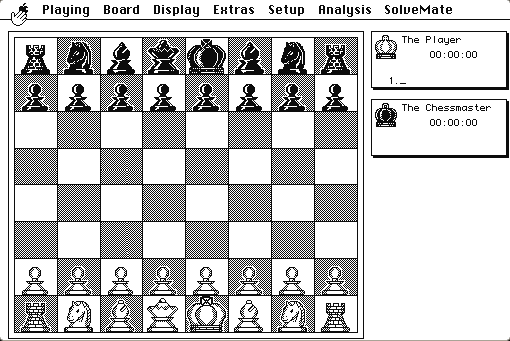
The Macintosh version is the austere one: black and white, a clean two-dimensional board, and the analysis window showing what the engine is considering. There is no wizard on screen.
Boots straight into a new game with the Chessmaster to move second. Drag a piece to move.
Controls
| Mouse | Drag a piece to move it |
| Skill menu | Set the engine's level, from beginner up to full strength |
| Analysis menu | Show what the engine is thinking, and its evaluation |
| Setup menu | Arrange a position, or set up a problem to solve |
| SolveMate | Find a forced mate in a given position |
The Chessmaster brand passed through Mindscape to Ubisoft and was published into the 2000s, so the name is not abandoned. The 1986 Macintosh build is in none of those products and has not been sold in about thirty years; it is hosted as an out-of-commerce artefact.
Archives
- Internet Archive — the Macintosh floppy this copy was made from.
How it works & what to expect
| Machine | Macintosh Plus, 512×342, black and white |
|---|---|
| System | The floppy's own — this disk carries the System it shipped with |
| Emulator | Mini vMac, compiled to WebAssembly |
| Version | 1.02 |
| Saves | Games save inside the emulated Mac, in your browser |
An 8 MHz 68000 thinking about chess is slow, and the emulator does not speed that up. At the higher levels the Chessmaster will take a long time over a move. The lower levels play instantly and are a fairer match for most people.
The analysis window is the interesting part of using it today. Watching a 1986 engine enumerate its principal variation, one ply at a time, on a machine this small, is a better demonstration of what the hardware could do than any benchmark.
Why it is remembered
It made chess programs mainstream. Before Chessmaster, chess software was sold to people who already cared about chess engines. The Software Toolworks packaged it for everyone else, and the line ran for twenty years and more than a dozen releases on the back of this one.
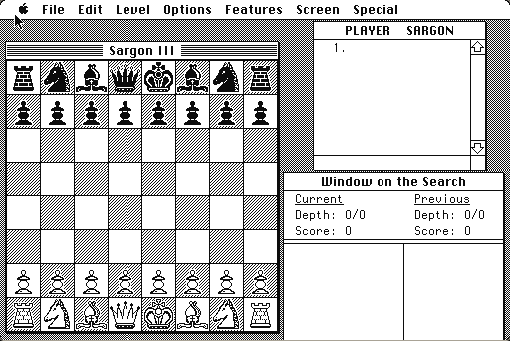
The engine was respectable. The Spracklen brothers, who wrote the Sargon programs, were the competition; Chessmaster 2000's engine held its own in the microcomputer tournaments of the period.
The teaching features were unusual. Position setup, forced-mate solving, and a visible evaluation were not standard in a consumer chess program in 1986, and they are the reason it was recommended to people learning rather than just to people playing.
Getting started
Set the skill level down before your first game. The default is not a gentle opponent and the higher levels will also make you wait.
Turn on the analysis display and leave it on. Seeing the line the engine expects — and watching it change its mind as the search deepens — is most of what makes an old chess program worth sitting in front of.
If you want to use it as a study tool, the Setup menu lets you place pieces freely and hand the position to the engine, which is the quickest way to find out whether the endgame you have been arguing about is actually won.
Questions people ask
How strong is it?
Respectable for 1986 and beatable by a decent club player, particularly at the lower levels. It is not competitive with a modern engine and is not meant to be.
Why is it slow at high levels?
It is an 8 MHz 68000 searching a chess tree. The emulator runs the machine at its real speed, so a hard level takes as long as it did in 1986.
Can I set up a position?
Yes — the Setup menu lets you place pieces freely, and SolveMate will look for a forced mate from there.
Can I save a game?
Yes. Saves live inside the emulated Macintosh in your browser.
Is this related to the modern Chessmaster games?
It is the first of the same line, but no Chessmaster product sold in the last thirty years contains this program.
Is it in colour?
No. This is the Macintosh version, which is black and white at 512×342.
Put The Chessmaster 2000 on your own site
Free, no permission needed and no account. Paste this where you want the machine to appear; it brings its own emulator and asks nothing of your page.
<iframe src="https://macemu.com/embed/chessmaster-2000/"
        width="512" height="342"
        style="border:0;max-width:100%"
        allowfullscreen
        title="The Chessmaster 2000"></iframe>
<p><a href="https://macemu.com/run/chessmaster-2000/">Play The Chessmaster 2000</a> free on macemu</p>
Sized to this title's real screen. How embedding works.