System 7.5 — the whole desktop
Runs here
1996 · Apple · System 7 · Mini vMac (Mac II) · 640×480 at 8-bit colour
Guide updated October 2026
Yes: System 7.5 runs free in your browser on this page. Press Start and it boots System 7 on an emulated Mac II, with no download, no plugin and no account. Controls: Apple menu (top left) (hold the button down), Double-click System 7.5 (open the hard disk in the Finder).
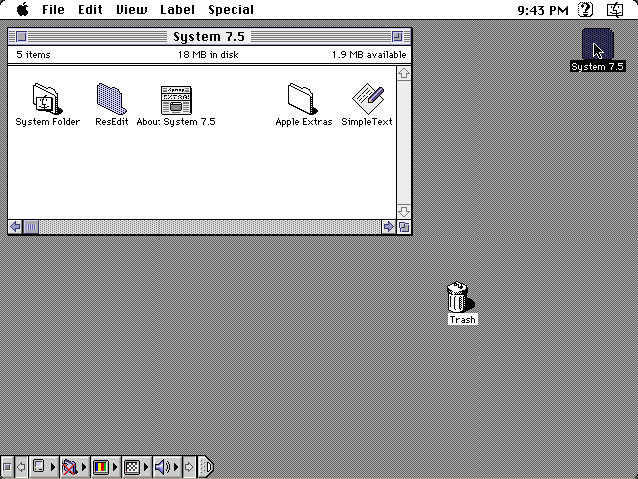
Not a game and not an application: the whole machine. This is System 7.5.3 booting to its own desktop on an emulated Macintosh II, in colour, with the Finder, the Apple menu, the Control Strip along the bottom of the screen and a clock in the menu bar.
System 7 was the Macintosh from 1991 until 1997, and most of the classic Mac software library was written for it. If you remember a Mac in a school lab, an office or a bedroom in the early 1990s, it was very probably running some version of this.
Boots to the System 7.5 desktop on an emulated Macintosh II. ResEdit's window is open from the last time someone used this disk: close it, then double-click System 7.5 at the top right. Nothing you do here is kept between visits.
Controls
| Mouse | Everything. It is a Mac. |
| Apple menu (top left) | Hold the button down: Stickies, Note Pad, Calculator, Jigsaw Puzzle, Control Panels |
| Double-click System 7.5 | Open the hard disk in the Finder |
| Cmd-N | New folder in the Finder |
| Special menu | Restart and Shut Down |
System 7.5.3 is Apple's. Apple published it as a free download from its own servers in the 1990s, has not sold it in nearly thirty years, and it runs on no machine Apple makes. Full reasoning is in notices/system-7.md, and the takedown promise applies without argument.
Archives
- Infinite Mac has every version of the classic Mac OS, from the project whose emulator builds this site uses.
- Internet Archive keeps the System 7.5.3 install sets Apple released.
How it works & what to expect
| Machine | Macintosh II, 640×480 in 256 colours |
|---|---|
| Processor | Motorola 68020, emulated |
| System | System 7.5.3, from 1996 |
| Emulator | Mini vMac, compiled to WebAssembly |
| Changes | Not kept. Every visit starts from the same clean disk. |
A System 7 disk is small by modern standards, about twenty megabytes, so the first boot takes a few seconds rather than the minute the Mac OS 8 machine needs. Your browser keeps the pieces it has downloaded, and later visits start faster.
Break it as much as you like. Drag the System Folder somewhere strange, change the desktop pattern, throw things in the Trash. Reload the page and it is back the way it was. That also means nothing you write in Note Pad or Stickies survives a reload, so don't keep anything there you want to keep.
What to actually look at
The Apple menu. Press and hold on the apple at the top left. System 7 turned the Apple menu into something you could fill yourself: anything placed in the Apple Menu Items folder shows up there. 7.5 added submenus for Control Panels and for recently used applications and documents, which is why some items have arrows.
Stickies. Yellow notes on the desktop, new in System 7.5. It is still in macOS today, essentially unchanged.
The Jigsaw Puzzle. 7.5 replaced the original Macintosh sliding-tile Puzzle with a jigsaw of a picture, pieces scattered for you to drag back into place. It is good practice with a mouse, and surprisingly hard to stop doing.
Key Caps and the Scrapbook. Key Caps shows which character each key types in the current font, which is how you found ® or ¢ before character pickers existed. The Scrapbook is a place to keep clippings that survive between copy and paste.
The Control Strip, the row of small tiles at the bottom left. It was made for PowerBooks, so you could change the volume or the screen without opening a control panel, and this disk has it running on a desktop Mac.
ResEdit. Apple's own resource editor, on this disk next to the System Folder. Classic Mac files kept their icons, menus, dialog boxes and sounds as separate resources, and ResEdit let anyone open an application and change them. A generation of Mac users learned what a program was made of by doing exactly that.
Where System 7 sits in the story
System 7 shipped in May 1991, and it was the largest change to the Macintosh since 1984. 32-bit colour came built in. MultiFinder, which had let several programs run at once as an add-on, became the only way the Mac worked. It brought aliases, balloon help, file sharing between Macs on a network, TrueType fonts that scaled cleanly to any size, and virtual memory on machines that could use it.
It also needed more machine: two megabytes of memory, twice what a Mac Plus came with, and plenty of people stayed on System 6 for years. That is why so much early software on this site runs on System 6 instead.
What runs here is 7.5.3, from 1996. System 7.5, released in 1994, added Stickies, the Jigsaw Puzzle, the menu-bar clock, WindowShade (double-click a title bar and the window rolls up into it) and Apple Guide's step-by-step help. 7.5.3 was a maintenance release that ran on both the old 68k Macs and the new Power Macintosh, and Apple made it a free download.
The next release, 7.6 in 1997, was the first to be called Mac OS, which is why people still search for this as Mac OS 7. Mac OS 8 followed later that year, and it runs here too.
Questions people ask
Is this a real System 7?
Yes. It is a real System 7.5.3 install booting on an emulated Macintosh II with a 68020 processor, not a picture or a re-creation of the interface.
Is System 7 the same as Mac OS 7?
Yes. Apple called it System 7 until version 7.6 in 1997, which was the first release officially named Mac OS. People search for either name and mean the same system.
Does it save what I do?
No. Every visit starts from the same clean disk, so notes, files and settings are gone after a reload. The games on this site do save; this machine is for looking around.
Can I run my own old Mac software on it?
Not from this page, but the file loader opens a disk image or a .sit archive you bring on an emulated Mac of its own, running this same System 7.5.
Why a Macintosh II?
Because Mini vMac brings the Macintosh II up in colour straight away. Basilisk II, which the file loader uses, starts in black and white until you change it in the Monitors control panel.
Why is ResEdit's window open when it starts?
Because it was open on the disk when it was saved. Close it with the box at its top-left corner. ResEdit is Apple's own free resource editor and worth a look.
Does the internet work?
No. The emulated Mac has no network connection.
Is this legal?
Apple released System 7.5.3 as a free download in the 1990s and has not sold it in nearly thirty years. The reasoning is written out in full on the notice linked above, and the takedown promise is unconditional.
Put System 7.5 on your own site
Free, no permission needed and no account. Paste this where you want the machine to appear; it brings its own emulator and asks nothing of your page.
<iframe src="https://macemu.com/embed/system-7/"
        width="640" height="480"
        style="border:0;max-width:100%"
        allowfullscreen
        title="System 7.5"></iframe>
<p><a href="https://macemu.com/run/system-7/">Play System 7.5</a> free on macemu</p>
Sized to this title's real screen. How embedding works.